> ## Documentation Index
> Fetch the complete documentation index at: https://billing-docs.razi.ai/llms.txt
> Use this file to discover all available pages before exploring further.
# Entitlements Usage
The user authentication in all the flows related to the billing API is handled by the client backend app in same way in Authentication and Plans.
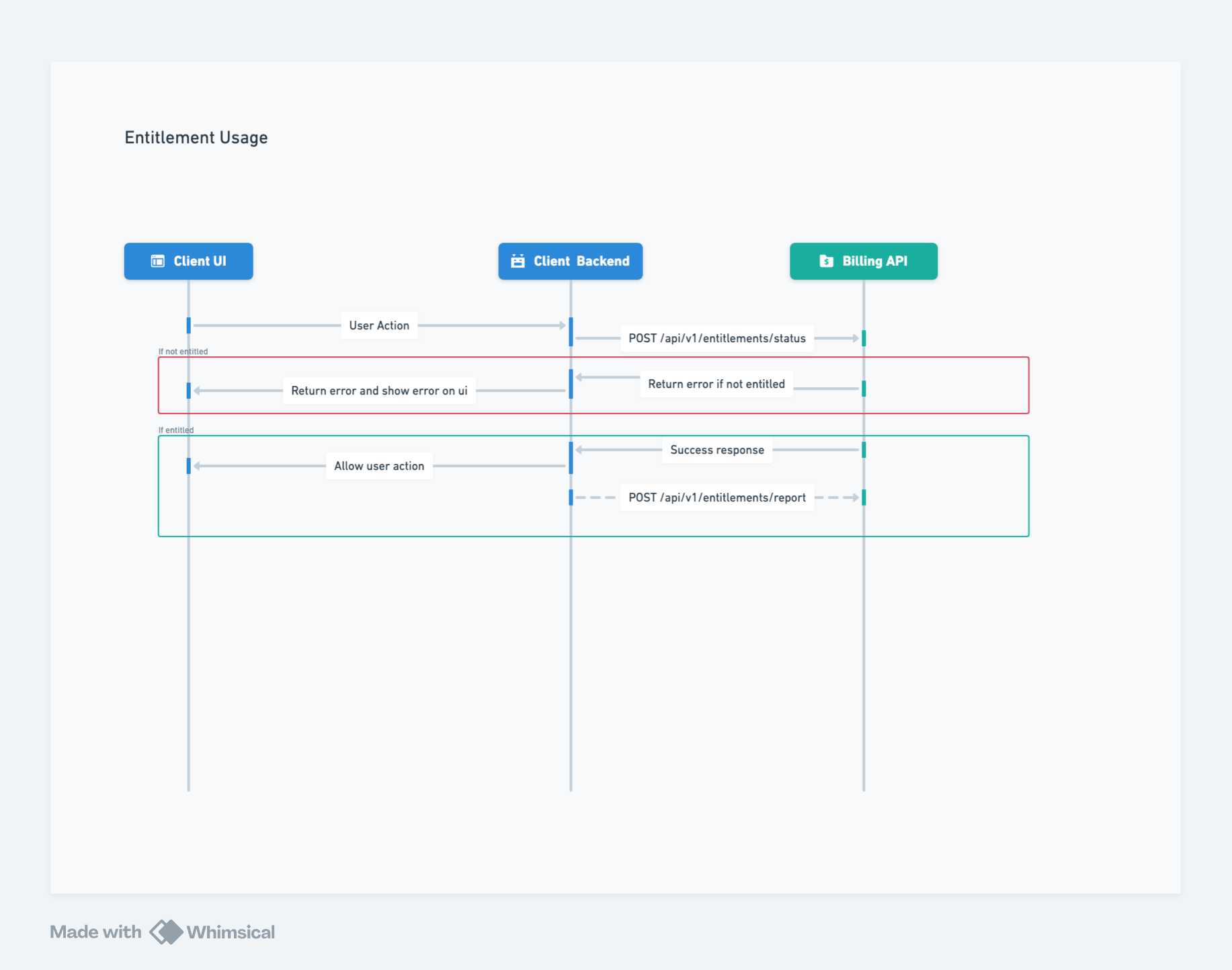
This guide explains the flow for using entitlements in your app.
## Entitlement Usage Flow
The client UI sends a request to the client backend for an action, such as downloading a resource.
The client backend calls the Billing API endpoint `/api/v1/entitlements/status` to check if the user is allowed to perform the action.
If the user is not entitled, the Billing API returns an error. The client backend should handle this error appropriately.
If the user is entitled, the Billing API returns a success response.
If entitled, the client backend can perform the action or forward the success response to the client UI.
The action execution is reported to the Billing API using the `/api/v1/entitlements/usage` endpoint.