> ## Documentation Index
> Fetch the complete documentation index at: https://billing-docs.razi.ai/llms.txt
> Use this file to discover all available pages before exploring further.
# Payment Flow with Stripe
> Learn how to implement the payment flow using Stripe
The user authentication in all the flows related to the billing API is handled by the client backend app in same way in Authentication and Plans.
# Payment Flow with Stripe
This guide explains how to implement the payment flow using Stripe and the Billing SDK.
## Setting Up Stripe Payment
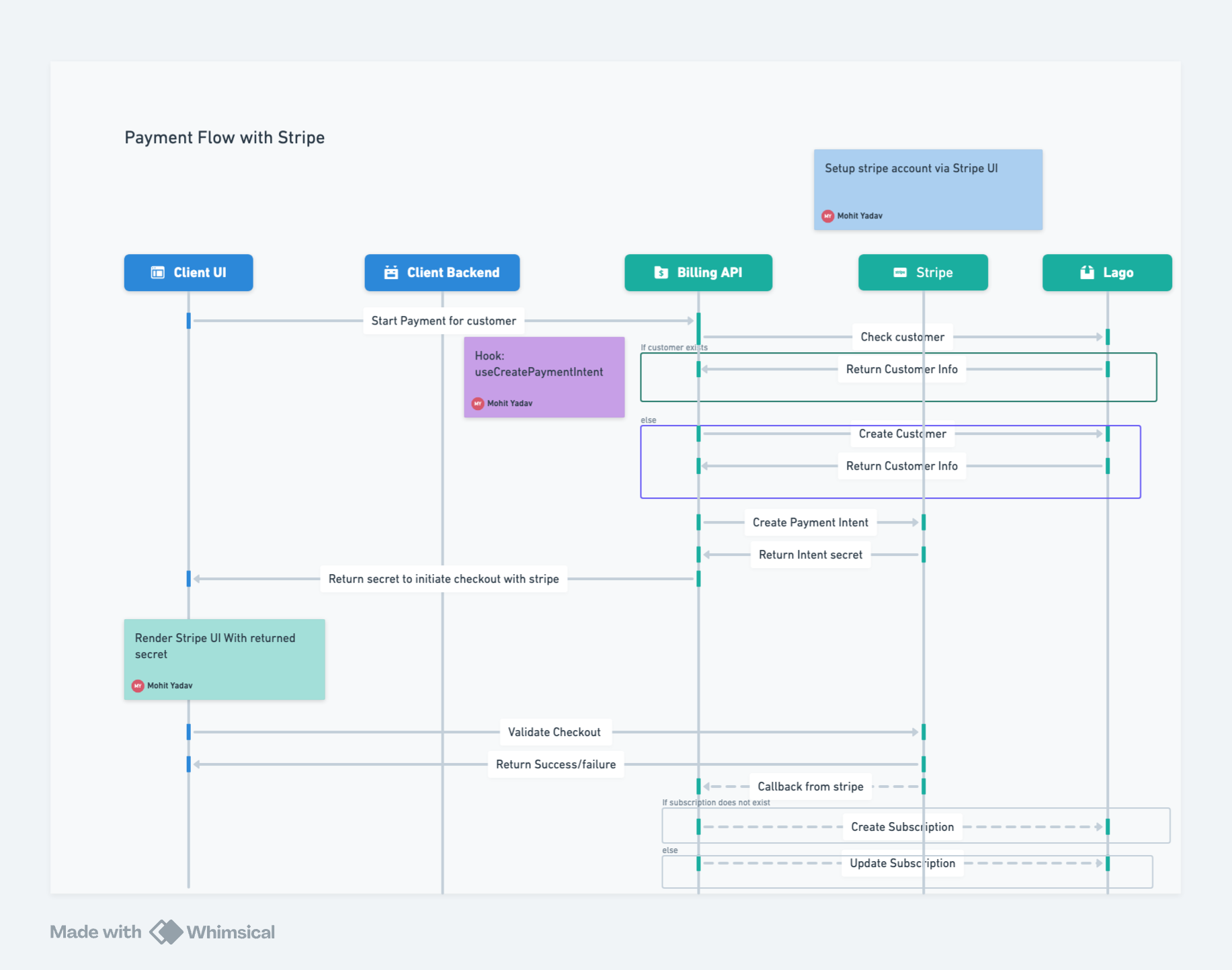
The client uses the useCreatePaymentIntent hook to initiate a payment intent, forwarding the request to the Billing API.
The Billing API checks if the customer exists in Lago. If yes, it returns the customer information; if not, it creates a new customer and returns the information.
The Billing API forwards the customer information to Stripe.
If the information is valid, Stripe returns a secret which is passed back to the client UI.
The client UI renders the EmbeddedCheckoutForm from the Billing SDK.
The user fills in the required information. This information, along with the secret, is sent to Stripe, which then redirects the client to the success/failure page.
Once the flow completes, Stripe returns the payment information to the Billing API via a callback URL.
Based on the information from Stripe, the Billing API creates or updates the subscription in Lago.